How to choose a managed IT provider that is right for your company is a big decision for any business. Your IT partner will be handling vital systems, security, and support for your team. You need someone competent and trustworthy.
So, how do you evaluate potential providers? Here are key questions to ask (and why they matter) when determining how to choose a managed IT provider that is right for your SMB.
10 Questions to Ask
- “What services are included in your managed IT plan?” – Get a clear list of what the provider will do for you under the flat fee. Do they handle day-to-day helpdesk support for users? 24/7 monitoring of your servers and network? Cybersecurity measures (firewall management, antivirus, patching)? Backups and disaster recovery planning? You want to avoid surprises about “what’s extra.” Reputable MSPs offer comprehensive support. For example, many include regular onsite visits, unlimited remote help, proactive maintenance, cybersecurity suite, and strategic consulting (as Cinch IT does per their site). Ensure any special needs (e.g., support for a specific software your industry uses) can be met. Essentially, you’re drawing the scope of the partnership.
- “How do you ensure data security and compliance?” – In today’s environment, security is paramount. Ask about the specific security measures the MSP will implement. Are they going to enforce multi-factor authentication, manage antivirus/EDR on all endpoints, and keep systems patched? Do they offer security awareness training for your staff? If your business has compliance requirements (HIPAA, PCI, etc.), inquire if they have experience meeting those. A good provider should articulate a layered security approach and mention the standards or frameworks they use. For instance, a strong answer might be: “We implement MFA everywhere, next-gen endpoint protection, encrypted offsite backups, and regular security audits for our clients. We’re familiar with HIPAA requirements and will sign a BAA if needed.” You want to hear that security isn’t just an afterthought, insurers now demand things like MFA, EDR, and backups from all businesses, so your MSP should too.
- “What’s your response time and SLA for support requests?” – How quickly can you expect help when something goes wrong? Managed IT is often defined by its Service Level Agreement (SLA). For example, they might say “we guarantee a 1-hour response for critical issues and 4 hours for normal issues.” Check if support is 24/7 (especially if you operate outside 9-5 or have global offices). You also might ask, “Do you have local technicians who can come on-site if needed, and how quickly?” A provider with a local presence is valuable for emergencies. Essentially, you’re looking for commitment that they won’t leave you hanging. Downtime is costly, so a good MSP should prioritize rapid response. Some MSPs even offer penalties if they miss an SLA (this is a plus, as it shows accountability).
- “Can you provide client references, especially from similar industries or in the Area?” – A trustworthy MSP will have happy clients willing to vouch. Ask to speak to a couple of their clients or for case studies. This question is crucial as you will learn how they perform in real life. If you’re in, say, a medical office, talk to another medical client of theirs about how the MSP handles HIPAA and sensitive data. It’s a good sign if they have clients of various tenures, and if all references have been with them 3+ years, that indicates satisfaction and stability. According to AIS’s research, understanding how an MSP solved a specific client’s problems (and how they handled any mistakes) provides deep insight. While it may seem like a silly question, don’t skip this step, it separates marketing promises from actual outcomes.
- “What is your approach to proactive maintenance and prevention?” – The whole point of managed IT is to prevent fires, not just fight them. Ask how they keep systems healthy. Do they do regular patching of OS and apps? Do they monitor network performance and address issues before users notice? How frequently do they review your infrastructure for improvements? For example, Cinch IT mentions quarterly strategic reviews and an emphasis on stopping problems before they happen. You want an MSP that isn’t just reactive. A great follow up question is, “Can you give an example of how you identified and fixed a problem for a client before it caused downtime?” Their answer will reveal if they truly embrace proactivity or if they mostly operate reactively.
- “How do you handle backups and disaster recovery?” – Data backup is critical. Ask if they set up and manage backups for you, and more importantly, ask if they test restores regularly. Learn what’s their plan if a server fails or ransomware strikes; do they have the capability to quickly spin up your servers in the cloud (business continuity)? Since most cities are not immune to natural issues (blizzards, etc.), ensure they have off-site backup storage. Essentially, confirm that they won’t just back up your data, but also help get you running again quickly after an incident. As a point of reference, Coalition Insurance requires good data backups as a condition for cyber coverage, proving that it’s that important.
- “What cybersecurity protections do you include by default?” – Beyond backups, clarify specifics on security. MFA on your systems, anti-virus/EDR on endpoints, firewall management, email filtering, dark web monitoring – what’s in the package? Today, any serious MSP will include a stack of security services. If they upcharge significantly for basic protections, that’s a red flag (security can’t be optional nowadays). Ask if they provide security awareness training to your users – some do quarterly phishing simulations or have training portals to reduce human risk (a cost-effective method since human error is a factor in most breaches). Given 51% of small businesses have no cybersecurity measures, a good MSP’s role is to make sure you’re not in that bucket and meet insurer and regulatory security baselines.
- “Do you have experience with our industry’s software/compliance?” – If your business uses specialty software (for example, a specific ERP, or dental office software, etc.), ask if the MSP has experience with it or at least with similar clients. An MSP doesn’t need to be an expert in every app, but familiarity helps. Likewise, if you’re in a regulated field, quiz them on that: “Have you helped companies through HIPAA or PCI compliance audits?” or “Do you know about CMMC or SOC 2 requirements?” Their answers will tell you if they’ve handled those needs. Managed IT isn’t one-size-fits-all; a provider who knows your industry will get up to speed faster and add more value, potentially even suggesting the best practices they’ve seen at similar firms.
- “What does onboarding look like, and how do we disengage if needed?” – Onboarding: ask how they’ll take over your IT with minimal disruption. Will they do an initial assessment? Install their monitoring agents on PCs? Any upfront costs? A well-organized MSP should have a documented onboarding process and timeline. On the flip side, also ask about terms and exit procedures. Is it a 1-year contract? Auto-renewing? What if you want to leave, do they help transition you out smoothly? It’s important to know that you’re not handcuffed. Providers confident in their service often have opt-out clauses or 30- to 60-day outs because they trust you’ll stay due to quality, not contract locks.
- “Why should we choose your company over others?” – This open-ended question lets the MSP highlight their strengths. Maybe they’ll mention their local presence (fast on-site support from techs who can be at your office in 30 minutes if needed), their vertical expertise, or great customer satisfaction stats. Listen for meaningful differentiators, not fluff. For example, “We answer support calls live 99% of the time” or “We have a 15-minute average email response time”. Or, “Our client retention rate is 95% over 5 years” says a lot and provides good tangible results. On the other hand, vague statements like “We really care and have the best team” is nice, but ask for evidence (certifications, awards, client stories). Since there are over 40,000 MSPs in the US, you want to hear why they stand out with data to back it up.
Finally, ensure you vibe well with the MSP’s representatives. You’ll be working closely with your managed IT provider. Did they communicate clearly? Were they candid and not overly salesy in answering these questions? The relationship aspect is big, you need to trust them like an extension of your team and is a crucial step in how to choose a managed IT provider that is right for you. As Integris’ guide notes, check third-party reviews (Clutch, Google, BBB) and see if they’ve made any industry “best of” lists. Those can validate their claims.
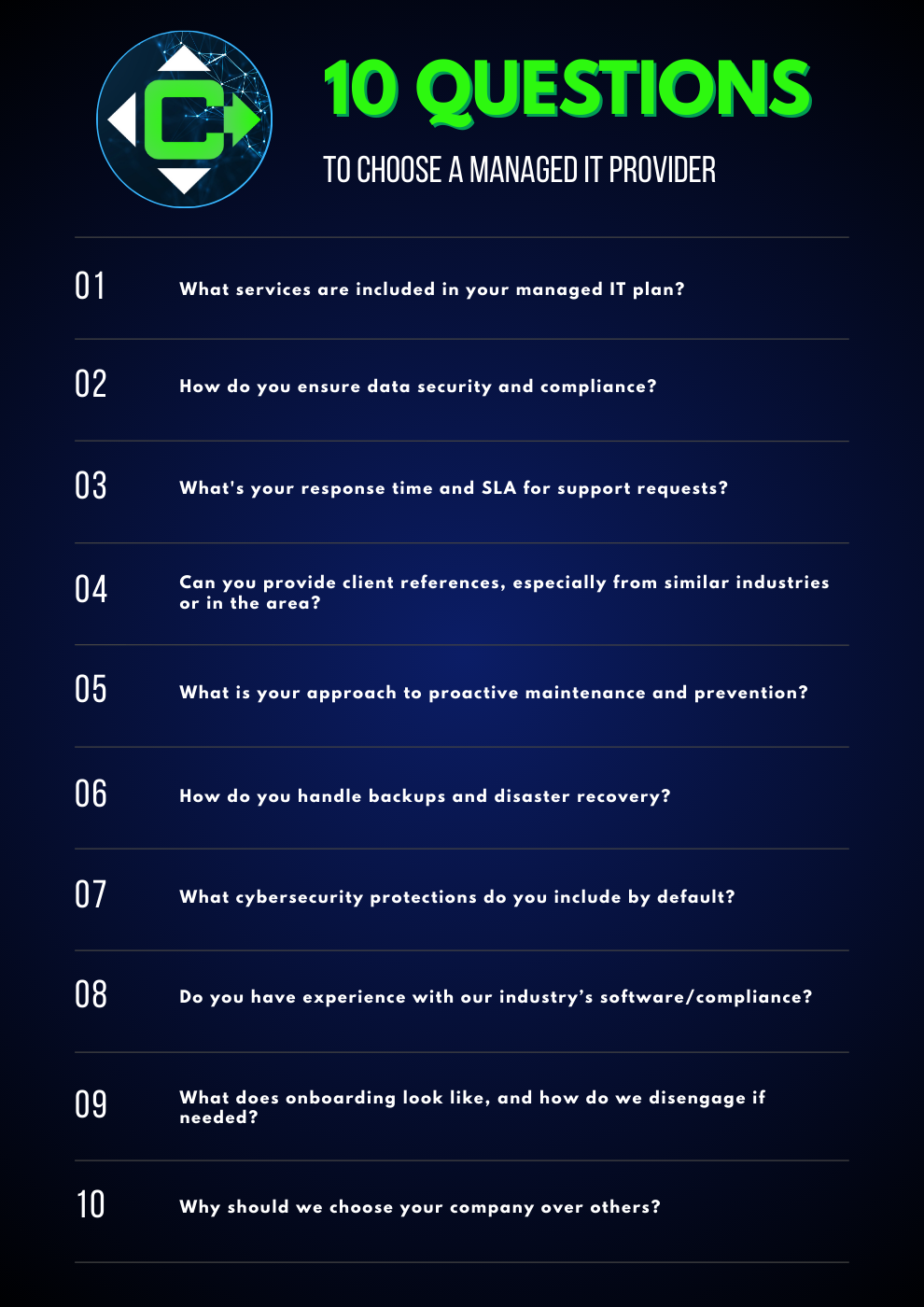
Downloadable 10 questions for how to choose a managed IT provider
____________________________________________________________________________
Conclusion: Choosing the Right a Managed IT Provider
How to choose a managed IT provider is not just about technical fit, but also cultural fit and reliability. Asking these questions will help you cut through marketing, find a partner who will proactively support your business, and feel confident in picking an MSP who provides tangible evidence of their good work. When determining how to choose a managed IT provider the ideal provider will happily answer all of the above, possibly even bringing them up before you ask, because they know an informed client is their best client.
The right partner doesn’t just fix problems, they reduce downtime, enhance security, support your growth, and act as a true extension of your team. By asking the right questions, evaluating their capabilities, and assessing how well they understand your industry, you’ll quickly separate the reactive vendors from the strategic partners.
A dependable managed IT provider should be transparent, proactive, security-focused, and committed to long-term success, not short-term contracts. Use this how to choose a managed IT provider guide to confidently choose a partner that protects your business, empowers your employees, and keeps your technology running at peak performance.
____________________________________________________________________________
Frequently Asked Questions About How to Choose a Managed IT Provider
1. What does a managed IT provider actually do?
A managed IT provider monitors, maintains, and supports your business’s technology, including cybersecurity, backups, helpdesk requests, hardware, and ongoing system health.
2. Why choose a local MSP instead of a national provider?
Local MSPs can provide faster on-site support, understand local business needs, and offer more personalized service.
3. How much does a managed IT service plan cost?
Most MSPs charge a flat monthly rate based on the number of users, devices, and services included. Prices vary widely depending on cybersecurity requirements and complexity.
4. What should I look for in an MSP contract?
Pay attention to the service level agreement (SLA), contract length, exit terms, included services, and any extra fees for on-site support or after-hours help.
5. How do I know if an MSP is reliable?
Look for reviews, case studies, certifications, client references, and transparent processes for onboarding, security, and communication.
____________________________________________________________________________
About the Author
Niko Zivanovich is a Cybersecurity Leader with experience in helping organizations understand and achieve a more complete security posture. He is a co-owner of Cinch IT of Denver and has been working at Pellera Technology Solutions for 6 years, most recently as the Director of Cyber Defense and Threat Intelligence. Niko specializes in CISO advising, netsec ops, incident response, pen testing, and threat intelligence research. He holds multiple certifications through the SANS GIAC organization and is a Board Director for the InfraGard Colorado and Wyoming Chapter.
Enjoyed the How to Choose a Managed IT Provider – 10 Simple Questions to Ask article? If so then head over to our Blogs for more top tech tips.
Or follow our LinkedIn page for weekly tech tips, industry insights, and practical cybersecurity guidance for SMBs.
____________________________________________________________________________
About Cinch I.T.
Looking to gain greater control over your technology and security? We specialize in helping businesses like yours take proactive steps with strategic services, including a comprehensive IT Control Checklist Assessment. Our team is committed to being more than just a service provider, we’re your dedicated partner in achieving operational efficiency and peace of mind. With our fast, friendly, and transparent approach, you’ll always know where you stand and how to move forward. With Cinch I.T.
No need to keep asking yourself “how to choose a managed IT provider that is right for my SMB”, instead discover how Cinch’s IT support through community can support your success through smarter, friendlier, and more secure technology solutions. Contact us today!
Click here to find your nearest local Cinch I.T. office:
- Tempe, AZ
- Atlanta, GA
- Sandy Springs, GA
- Louisville, KY
- Framingham, MA
- Marlborough, MA
- Newton, MA
- Springfield, MA
- Woburn, MA
- Worcester, MA
- Waukesha, WI
- Denver, CO
- Logan, UT
- Moab, UT
- St. George
-
_______________________________________________________________
Sources
These questions from the “How to Choose a Managed IT Provider – 10 Simple Questions to Ask” article were developed using guidance from leading MSP industry frameworks, cybersecurity best practices, and current insurance requirements. Insights from the AIS Group’s “Top 10 MSP Questions” guide also helped shape several of the points included here.
Additionally, Channel Futures reports that 64% of midsize businesses and 65% of small businesses plan to increase their managed services spending in 2025, highlighting just how many organizations are actively evaluating IT providers right now. And Today’s cyber insurers increasingly require controls like MFA, EDR, robust backups, and ongoing user training – standards that any qualified MSP should fully support.
By using the questions above as your due-diligence checklist with how to Choose a Managed IT Provider, you’ll dramatically increase your chances of selecting an MSP that keeps your systems reliable, secure, and aligned with your long-term goals.