“Zero Trust” is a cybersecurity buzzword you might have heard, but does zero trust for smbs mean? In a nutshell, Zero Trust is a security model that says trust nothing and verify everything. In traditional IT security, you might have a trusted internal network and untrusted outside world. Zero Trust flips that: it treats every login, device, and network connection as untrusted until proven otherwise, even if it’s inside your perimeter. The goal is to sharply reduce the chance that a hacker who breaches one device or account can roam freely through your systems.
Zero Trust for SMBs can sound complex or enterprise-only, but you can absolutely begin implementing its principles quickly. In fact, you can make meaningful strides in the next 30 days. Here’s how.
Core Principles Of Zero Trust For SMBs
1. Verify Every User’s Identity: Don’t assume a username/password is legit; add additional checks (MFA, context).
2. Verify Every Device: Ensure any device accessing your data meets security standards and is known.
3. Least Privilege Access: Users/apps get the minimum access they need, nothing more. Segment networks and data so that a compromise doesn’t unlock everything.
4. Assume Breach: Design as if an attacker is already in your network; how do you limit their movement?
For a small business, Zero Trust might mean adopting things like MFA, modern endpoint management, network segmentation, and continuous monitoring.
30-Day Jumpstart Plan
Week 1: Lock Down Identity with MFA & SSO. The easiest and highest impact Zero Trust for SMBs step is enabling multi-factor authentication (MFA) across all your key accounts.
As noted earlier, MFA stops 99.9% of automated attacks. Implement MFA on email, VPN, banking apps, etc. If you use Microsoft 365 or Google Workspace, turn on MFA for all users (and admin accounts especially). Also, consider using a Single Sign-On (SSO) solution for central identity (Azure AD, Okta, etc.) – this lets you manage one strong identity per user for many apps, so you can enforce MFA and security policies uniformly.
Many SMBs already subscribe to Microsoft 365 Business Premium or Google Workspace, which include SSO capabilities. Use them! The result: every user’s identity is continuously verified. If someone’s password is stolen, the thieves still can’t log in without the second factor. This directly supports Zero Trust’s “verify explicitly” pillar. In 30 days, this is very doable and provides immediate risk reduction.
Week 2: Map Out and Segment Your Network. Believe it or not, you don’t need a fancy firewall to do some segmentation. Start by identifying your critical assets – maybe an on-prem file server or a finance database. If possible, put these on a separate VLAN or subnet with stricter access rules.
If you have a business-class firewall, configure internal segmentation (e.g., office IoT devices like cameras and thermostats on an “IoT” VLAN separate from your PC LAN). At a minimum, ensure your guest Wi-Fi is isolated from your corporate network. The idea is to prevent an attacker (or malware) from easily spreading if they compromise one thing.
Many breaches in flat networks escalate quickly; segmentation contains that. Also, implement host-based firewalls on PCs/servers – for instance, block SMB file-sharing traffic between computers that don’t need it. You can often use built-in OS firewalls via Group Policy or endpoint management. This is a step toward Zero Trust’s network pillar (micro-segmentation). In a month, you can achieve basic segmentation in a small office environment.
Week 3: Enforce Device Trust and Compliance. Zero Trust says a device’s security posture should be checked before accessing resources. For SMBs, a simple step: ensure all company PCs have up-to-date OS, antivirus, and disk encryption. You can deploy an agent or use your RMM tool to attest to device health.
If you use Microsoft 365, leverage Intune compliance policies: e.g., require devices to have a password/PIN, encryption (BitLocker), and not be jailbroken, or else they’re marked non-compliant. Then create a Conditional Access rule that only allows M365 logins from compliant devices. Google Workspace similarly can enforce basic device policies for mobile and endpoints (like requiring a screen lock). This way, even if a user logs in correctly, if their device is risky (out of date or unknown), you limit access.
Within 30 days, aim to enroll all company-owned devices into some management (even if it’s just enabling basic mobile management for phones). For personal BYOD devices, consider limiting their access to less critical data or using a virtual desktop/app for them.
The key outcome: you gain visibility into devices and set baseline requirements (patches up to date, etc.), embodying the device pillar of Zero Trust.
Week 4: Implement Least Privilege & Critical Service Protection. Use this final week to tighten permissions and protect key assets. Audit admin accounts: ensure each admin has their own (no shared logins), and remove any excessive admin rights. Set up privileged access management if possible. For instance, use Microsoft’s PIM (Privileged Identity Management) to give just-in-time admin access that expires. For regular users, remove them from local administrator group on their PCs; have a separate admin account for IT tasks. Also, review file share permissions – does everyone really need access to all shares? Probably not; adjust ACLs accordingly. This reduces insider risk and attack surface.
Another aspect: implement MFA for VPN or remote access and consider shutting down risky services. For example, if you have Remote Desktop (RDP) open to the internet, that’s a big no-no in Zero Trust. Close it or secure it behind a VPN with MFA. Many ransomware attacks hit SMBs via exposed RDP – Zero Trust would say authenticate and broker access in a safer way (like Remote Desktop Gateway or a zero trust network access tool).
In 30 days, you can likely eliminate all default passwords, ensure admin roles are assigned wisely, and close common holes.
One stat: credential theft causes 55% of ransomware attacks, so by minimizing privileged creds and protecting logins, you drastically cut risk.
Extra Credit (Day 30 and beyond)
Set up logging and monitoring aligned to Zero Trust for SMBs. This means centralizing logs from your identities (Azure AD sign-in logs, etc.), devices (AV alerts), and network (firewall logs). If an anomaly occurs – like an account logging in from Russia or a device suddenly downloading tons of data – someone should know. Even using free/low-cost tools like Azure Sentinel (which has free data ingestion for some sources) or subscribing to a managed SOC service for SMBs can help detect when the “never trust” principle finds something fishy.
Also, start phasing out any legacy trust assumptions: e.g., do away with “trusted networks” where MFA isn’t required (attackers can be on local networks via Wi-Fi or malware). Over time, move toward per-app verification (using tools like Cloudflare Zero Trust or Azure Application Proxy for internal apps, requiring login each time with SSO). That’s more advanced, but worth planning. According to CISA’s maturity model, SMBs can reach an initial zero trust state in 6-12 months with steady progress.
Local Note: SMBs operate in an environment of increasing cyber insurance and regulatory pressures to implement these controls. Cyber insurers now ask detailed questions – do you use MFA, do you restrict admin privileges, do you segment networks? (Yes, they really do.) Marsh’s ransomware study specifically mentions network segmentation and MFA as must-haves for good coverage. Also Colorado’s consumer data protection laws expect reasonable security practices. Adopting Zero Trust principles helps satisfy these external requirements too, essentially killing two birds with one stone: better security and easier compliance/insurance approvals.
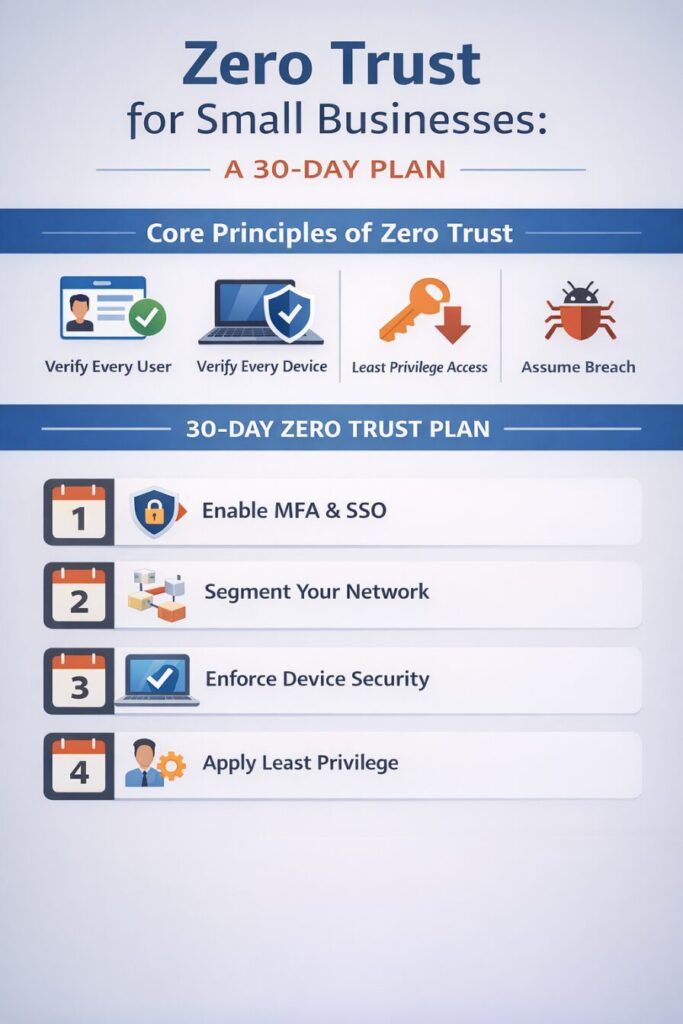
zero trust for SMBs 30-day week by week checklist
Zero Trust for SMBs Conclusion
In just 30 days you will have complete Zero Trust for SMBs architecture (full implementation is a journey, not a flip of a switch). You will have laid the foundation: identities verified (MFA), devices checked, access tightened. That alone puts you ahead of many peers; Techaisle research shows cost and complexity are barriers for 50%+ of SMBs in cloud security. But as we outlined, lots can be done with built-in tools and smart policies that cost little to nothing.
Zero Trust for SMBs is as much a mindset as a technology stack: “Never trust, always verify” in all access decisions. By instilling that mindset in these concrete steps, your SMB will drastically improve its resilience. And you’re doing it in manageable phases rather than an overwhelming project.
____________________________________________________________________________
About the Author
Niko Zivanovich is a Cybersecurity Leader with experience in helping organizations understand and achieve a more complete security posture. He is a co-owner of Cinch IT of Denver and has been working at Pellera Technology Solutions for 6 years, most recently as the Director of Cyber Defense and Threat Intelligence. Niko specializes in CISO advising, netsec ops, incident response, pen testing, and threat intelligence research. He holds multiple certifications through the SANS GIAC organization and is a Board Director for the InfraGard Colorado and Wyoming Chapter.
Enjoyed the What is Zero Trust for SMBs: What it is and How to Start in 30 Days article? If so then head over to our Blogs for more top tech tips.
Or follow our LinkedIn page for weekly tech tips, industry insights, and practical cybersecurity guidance for SMBs.
____________________________________________________________________________
About Cinch I.T.
Founded on the belief that I.T. support should be easy, Cinch I.T. has grown into one of the nation’s fastest-growing managed service providers. Our franchise model blends centralized expertise with local ownership, giving clients the best of both worlds. Our team is committed to being more than just a service provider, we’re your dedicated partner in achieving operational efficiency and peace of mind. With our fast, friendly, and transparent approach, you’ll always know where you stand.
Discover how Cinch IT Denver can support your success through smarter, more secure technology solutions. Contact us today!
Cinch IT Denver not your nearest location? View our nationwide Cinch I.T. offices:
- Tempe, AZ
- Atlanta, GA
- Sandy Springs, GA
- Louisville, KY
- Framingham, MA
- Marlborough, MA
- Newton, MA
- Springfield, MA
- Woburn, MA
- Worcester, MA
- Waukesha, WI
- Moab, UT
- St. George, UT
- Logan, UT
_______________________________________________________________
What is Zero Trust for SMBs Sources
The advice above is guided by the Zero Trust frameworks from NIST and CISA (CISA’s Zero Trust Maturity Model 2.0 emphasizes identity, devices, networks, apps, data, and visibility – the plan touched each of these). We referenced PingZine’s roadmap, which notes SMBs can see clear improvements in 30 days and robust maturity in 6-12 months. Verizon’s DBIR and Microsoft research reinforce key stats: e.g., MFA effectiveness (99.9%) and the prevalence of ransomware in SMB breaches, underscoring why Zero Trust steps are urgent. By leveraging existing cloud capabilities (like M365, Google, etc.), SMBs can begin Zero Trust without huge investment – a fact echoed by industry experts who note those platforms “now include zero trust features accessible without enterprise budgets”.
The bottom line: zero trust is attainable for SMBs, step by step.