No business is an island alone only with themselves… today, even small companies rely on dozens of vendors for critical services, from cloud software to IT support. But every third-party you work with introduces some level of vendor risk. What if that SaaS platform holding your data gets breached? Or if your managed service provider has a security lapse?
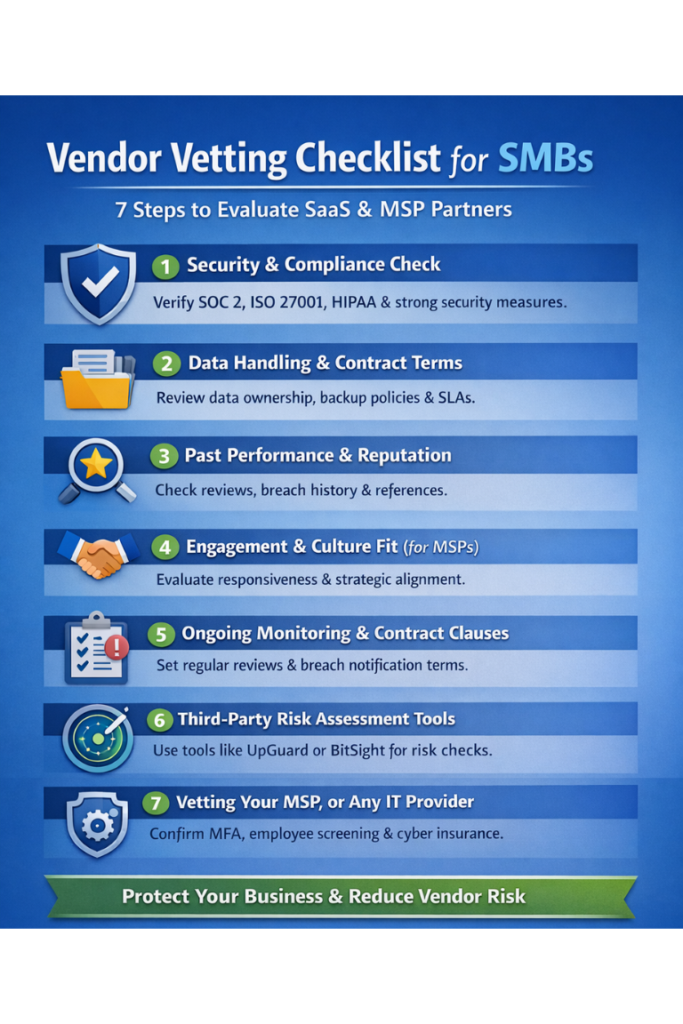
As an SMB, it’s vital to vet MSP partners and vendors up front and continuously, to ensure they meet security and reliability standards that protect your business. You don’t need a giant enterprise procurement team to do this; all you need is a practical checklist. Here’s 7 easy steps Denver SMBs can use to evaluate SaaS providers and vet MSP partners (Managed Service Provider) to reduce risk and sleep easier.
1. Security and Compliance Check
When considering a new SaaS vendor (whether it’s a CRM, accounting software, or any cloud service), start by probing their security posture. Do they have any third-party security certifications or audits? Common ones include SOC 2 Type II reports, ISO 27001 certification, or perhaps HIPAA compliance if health data is involved.
A SOC 2 report, for instance, will detail how they safeguard customer data – asking for one (and actually reviewing it or the executive summary) is a fair request. If a vendor can’t provide some evidence of security measures, that’s a red flag. Many small vendors might not have full SOC 2 yet, but they should at least answer a security questionnaire.
Ask about encryption (do they encrypt data at rest and in transit?), network security (firewalls, intrusion detection), and access controls (how do they prevent unauthorized employee access to your data?). Basically, ensure they follow industry best practices.
According to an SMB vendor checklist, verifying a cloud vendor’s compliance and security controls is step one of due diligence. A startling stat: the average company uses over 1,100 SaaS apps now – even if an SMB uses a fraction of that, it shows how much data we entrust to third-parties. You want to confirm those apps won’t mishandle your info.
2. Data Handling Policies and Contract Terms
Dig into how the vendor handles your data and what the contract says. Key things to check or ask: Who owns the data you upload and what happens if you leave the service? (Ideally you own it and can export it easily.) How long do they retain your data if you cancel? Do they share data with any sub-processors or partners? Also, what is their data backup and disaster recovery plan?
A good SaaS will have redundancy and regular backups – you might find this in their FAQ or security whitepaper. For MSPs, ask how they would keep your systems running in a disaster – e.g., do they have spare equipment, backup internet links, etc. Review the contract’s SLAs (Service Level Agreements): is there an uptime guarantee? Many cloud vendors promise 99.9% uptime (which is downtime of < 9 hours a year). Does the MSP contract specify response times for support requests? Ensure you’re comfortable with those commitments.
If a vendor will be handling sensitive or regulated data, insist on a Data Processing Agreement (DPA) and maybe proof of compliance like GDPR for EU data or PCI compliance if they’re touching card info.
3. Past Performance and Reputation
Look into the vendor’s track record. Have they had any public breaches or incidents in the past? A quick web search like “VendorName breach” can be revealing. If they did have an incident, how did they handle it? Transparency and improvement after an event can actually be a good sign.
Also seek out customer reviews or references. For an MSP, ask for references from a client of similar size or industry to you. Actually call or email those references and ask about their experience, any downtime issues, how the MSP communicates, etc. For SaaS, you can check sites like G2 or Capterra for reviews, but also trust your network – ask peers in a business forum if they’ve used that software and what problems they encountered. If the vendor has a Net Promoter Score (NPS) or published case studies, even better – as one guide says, case studies and NPS can gauge how well the provider has satisfied clients before you.
Don’t forget to evaluate the financial stability of key vendors. If you depend on a small SaaS startup for mission-critical operations, gauge whether they’ll be around in a year. This might be beyond what you can fully assess, but signs like recent funding, profitable growth, or being in business for a decent amount of time can indicate stability.
4. Engagement and Culture Fit (for MSPs)
To vet MSP partners or any IT partner, consider qualitative factors. Are they responsive and communicative during the courting phase? If they’re slow to respond to your sales inquiries, they might be slow when you’re a client too. Do they seem to understand your business needs and talk in plain language versus techno-jargon?
A good MSP will treat you as a partner, not just a ticket number. They should be willing to regularly meet, plan IT roadmaps, and provide strategic advice – essentially commit to being your outsourced IT department and care about your success. Commitment and communication are repeatedly cited as top qualities to look for. To vet MSP partners you want one who’s proactive and will tell you, for example, that your server is nearing capacity before it becomes a problem.
Check their expertise and certifications – are they certified partners of key vendors (Microsoft, Cisco, etc.)? Do they have relevant experience in your industry? If you’re a medical office, have they worked with HIPAA compliance before?
Ask for an outline of their onboarding process too. A professional MSP should have a documented onboarding plan to transition you smoothly. An unclear or ad-hoc onboarding could mean chaos and risk during the handover. This step is very important to vet MSP partners.
5. Ongoing Monitoring and Contract Clauses
Vetting isn’t one-and-done. Make vendor risk management an ongoing activity. For SaaS providers, stay alert to their security announcements or subscribe to their status updates. If they issue a new SOC 2 report annually, ask for it and read the high-level results. For critical vendors, you might conduct a yearly review meeting to discuss performance and any changes on either side.
Negotiate in contract clauses that protect you: for example, the right to terminate for cause without heavy penalties if they fail to meet security requirements or SLAs. Also ensure there’s a clause that they will notify you promptly of any data breach affecting your data (most will have this as part of compliance with laws).
Another tip: if the vendor will integrate deeply (like API access to your systems), consider a pilot program or phased rollout to test the waters. That way you can see how they perform on a small scale before fully committing.
6. Third-Party Risk Assessment Tools (Optional for SMBs)
If you want to get more rigorous to vet MSP partners, there are platforms (UpGuard, BitSight, etc.) that scan vendors’ internet-facing security (DNS, SSL configs, breach databases) and give a “security rating.” Large companies use these, but SMBs can leverage some free tools or trials just to see if a particular vendor has obvious issues (e.g., known data leaks or insecure configurations).
For instance, a quick UpGuard search might show if a vendor had a recent data breach or appears in leaked credential dumps – that’s useful intel. Additionally, if you’re subject to audits (say you have to comply with something like SOC or ISO and they check your vendor management), having documented your vetting process (questionnaires, checklists) and results will satisfy auditors that you’re handling third-party risk responsibly.
7. Vetting Your MSP, or Any IT Service Provider
Since MSPs will have privileged access to your systems, you need to treat their security as an extension of your own. Inquire about their internal practices: Do they use MFA on all their admin access? (They absolutely should.) How do they vet their employees – background checks? Do they have their own cyber liability insurance (and how much coverage)? A good MSP will be transparent about these and may even volunteer it.
You can also ask if they follow any best practice frameworks (like CIS Controls or if they have any certification like CompTIA Security Trustmark, etc.).
Ultimately, you are entrusting them with the keys to your kingdom, so don’t hesitate to ask hard questions. A reputable MSP welcomes that, and it shows you’re a savvy client.
Overview
By carefully vetting SaaS and MSP partners on these fronts – security, reliability, performance, and fit – you drastically reduce the chance of nasty surprises down the line. It’s far better to spend a little extra time upfront reading the fine print and asking questions to vet MSP partners than to deal with a vendor-induced breach or failure later.
Remember, your customers won’t distinguish if a breach was at your vendor – it will still damage your reputation, so you must hold vendors to high standards on your behalf and why taking the time to vet MSP partners is crucial. Taking these steps helps ensure your extended digital supply chain is as strong as your own in-house security.
How to Vet MSP Partners and Evaluate SaaS Providers Conclusion
In practice, many Denver SMBs lean on experts for this vetting. For example, Cinch I.T. Denver assists clients in reviewing prospective software vendors and has a vetted list of trusted partners for things like VoIP, cloud backup, and more. We’ve seen what good (and bad) vendors look like, and we use that experience to guide our clients.
Don’t be afraid to leverage your IT provider’s knowledge here – they can often spot red flags or recommend solid options, effectively pre-vetting vendors for you. With a bit of due diligence, you can confidently embrace the SaaS and services that drive your business, knowing you’ve minimized the risks of third-party relationships.
____________________________________________________________________________
Sources
Cloudmatos SMB vendor checklist; Impact Networking on MSP qualities (case studies, certifications); UpGuard on vendor risk management importance.
____________________________________________________________________________
About the Author
Niko Zivanovich is a Cybersecurity Leader with experience in helping organizations understand and achieve a more complete security posture. He is a co-owner of Cinch IT of Denver and has been working at Pellera Technology Solutions for 6 years, most recently as the Director of Cyber Defense and Threat Intelligence. Niko specializes in CISO advising, netsec ops, incident response, pen testing, and threat intelligence research. He holds multiple certifications through the SANS GIAC organization and is a Board Director for the InfraGard Colorado and Wyoming Chapter.
Enjoyed the Vendor risk for SMBs: how to vet MSP partners and evaluate SaaS providers article? If so then head over to our Blogs for more top tech tips.
Or follow our LinkedIn page for weekly tech tips, industry insights, and practical cybersecurity guidance for SMBs.
____________________________________________________________________________
About Cinch I.T.
Founded on the belief that I.T. support should be easy, Cinch I.T. has grown into one of the nation’s fastest-growing managed service providers. Our franchise model blends centralized expertise with local ownership, giving clients the best of both worlds. Our team is committed to being more than just a service provider, we’re your dedicated partner in achieving operational efficiency and peace of mind. With our fast, friendly, and transparent approach, you’ll always know where you stand and you always know you will have wi-fi security.
Discover how Cinch IT can support your success through smarter, more secure technology solutions. Contact us today!
Cinch IT Denver not your nearest location? View our nationwide Cinch I.T. offices: