
Small and mid-sized businesses (SMBs) don’t have the luxury of sprawling security teams or unlimited IT budgets, but they’re still expected to defend against the same threats as larger organizations.
The good news is that effective cybersecurity doesn’t have to start from scratch. By adopting the Center for Internet Security (CIS) Critical Security Controls, SMBs can quickly build a strong, practical foundation for protecting their systems and data. For SMBs looking to make meaningful security improvements without overcomplicating the process, these first 15 CIS Controls are the place to start. They provide a clear, structured path to strengthening defenses, improving visibility, and building resilience against the threats most likely to impact smaller organizations.
What is CIS?
The CIS Controls are a globally recognized, prioritized set of best practices designed to defend against the most common and impactful cyber threats. Rather than overwhelming organizations with endless recommendations, CIS controls for SMBs focus on what actually moves the needle.
In Version 8.1, Implementation Group 1 (IG1) defines the essential baseline for organizations with limited security resources. It includes 15 of the 18 total controls and 56 targeted safeguards, all specifically chosen to help SMBs reduce risk quickly and efficiently. These controls represent what many consider “essential cyber hygiene”, the core actions that stop a large percentage of everyday attacks before they ever become incidents.
The 15 CIS Controls SMBs Need to Implement
Below is a breakdown of the first 15 CIS Controls, explained in plain language with practical steps to help you start implementing them:
- Inventory and Control of Enterprise Assets: Keep an up-to-date inventory of all devices (computers, phones, IoT, etc.) connected to your network. You can’t secure what you don’t know exists. Maintain a list and regularly check for unauthorized or forgotten devices.
- Inventory and Control of Software Assets: Track all software running in your environment and allow only authorized, licensed applications. Removing unapproved or outdated software reduces vulnerabilities and ensures employees use secure, business-approved tools.
- Data Protection: Identify where your sensitive data resides and protect it through encryption, backups, and strict access controls. For example, an SMB might classify customer records as “confidential” and enforce that they’re stored only on encrypted drives with limited staff access.
- Secure Configuration of Enterprise Assets and Software: Configure hardware and software securely by disabling default passwords, unnecessary services, and open ports. For instance, ensure new laptops have firewall enabled and remove bloatware; similarly, configure cloud services with proper security settings from the start.
- Account Management: Maintain an accurate list of user accounts and promptly remove or update access when people leave or change roles. Every account should be tied to an active employee and use unique credentials – no shared logins for accountability.
- Access Control Management: Enforce least privilege – give employees the minimum access rights needed to do their jobs. This includes using unique IDs, strong passwords (or MFA), and promptly revoking access that is no longer required. A practical step is setting up role-based access in systems like Microsoft 365 to ensure, say, that accounting staff can’t view HR files, etc.
- Continuous Vulnerability Management: Regularly scan your systems for known vulnerabilities and apply patches or fixes. Many SMB cyber incidents stem from unpatched software. Schedule monthly vulnerability scans (many tools offer automated scans) and prioritize updating critical security patches (for operating systems, browsers, plugins, etc.).
- Audit Log Management: Enable logging on systems and centrally collect those logs for review. Even if you lack a dedicated Security Operations Center, storing logs (e.g., Windows Event Logs, firewall logs) for a few months means you can investigate suspicious events or compliance questions if needed. Consider using a managed SIEM service if in-house review isn’t feasible.
- Email and Web Browser Protections: Harden your email and web browsing – two primary infection vectors. Implement spam filtering, phishing protection (e.g., DNS filtering or Microsoft 365 Advanced Threat Protection), and ensure browsers are up-to-date and possibly augmented with ad-blockers or safe browsing modes. Train staff to be cautious with email links and attachments.
- Malware Defenses: Deploy anti-malware solutions on all endpoints and keep them updated. This includes antivirus/anti-spyware on PCs and perhaps DNS or web filtering to block malicious sites. Ensure these tools automatically update signatures. Also establish a policy for handling any malware alerts (isolation of the PC, scan others, etc.).
- Data Recovery (Backups): Regularly back up critical data and test your backups. Accidents and ransomware happen; having recent backups can save your business. Follow the “3-2-1” rule (3 copies, 2 different media, 1 offsite) – for example, use an on-site NAS and an off-site cloud backup. Test restoring files quarterly to ensure backups work.
- Network Infrastructure Management: Secure your network devices and network design. Change default router passwords, keep firmware updated, segment your network (e.g., guest Wi-Fi separated from internal traffic). Consider using a business-grade firewall to filter traffic. For remote workers, use a VPN to protect connections to the office.
- Network Monitoring and Defense: Monitor network traffic for unusual patterns and be prepared to respond. For SMBs, this might involve enabling intrusion detection/prevention (IDS/IPS) if your firewall supports it, or subscribing to an alert service that notifies you of potential breaches. Even basic steps, like reviewing firewall logs or receiving alerts when a new device joins the network, can greatly improve awareness.
- Security Awareness and Skills Training: Provide ongoing security training to employees. People are often the weakest link, so teach staff about phishing, safe internet use, and incident reporting. Free or affordable training modules and phishing simulation exercises can reinforce good habits. Building a culture of security awareness – where employees report suspicious emails instead of clicking – is a huge win for SMBs.
- Service Provider Management: Vet and manage the IT service providers and vendors who have access to your systems or data. This means keeping an inventory of vendors (your MSP, cloud providers, payment processors, etc.), ensuring contracts include security expectations, and reviewing their compliance (for example, if you use a cloud HR system, confirm they encrypt data and have proper certifications). Limit each vendor’s access to only what’s necessary and disable it when not needed.
Downloadable Copy
Getting started with the CIS Controls doesn’t have to be overwhelming. The first 15 controls are designed to deliver the most impact with the least complexity, making them ideal for SMBs. Below is a downloadable copy for quick reference:
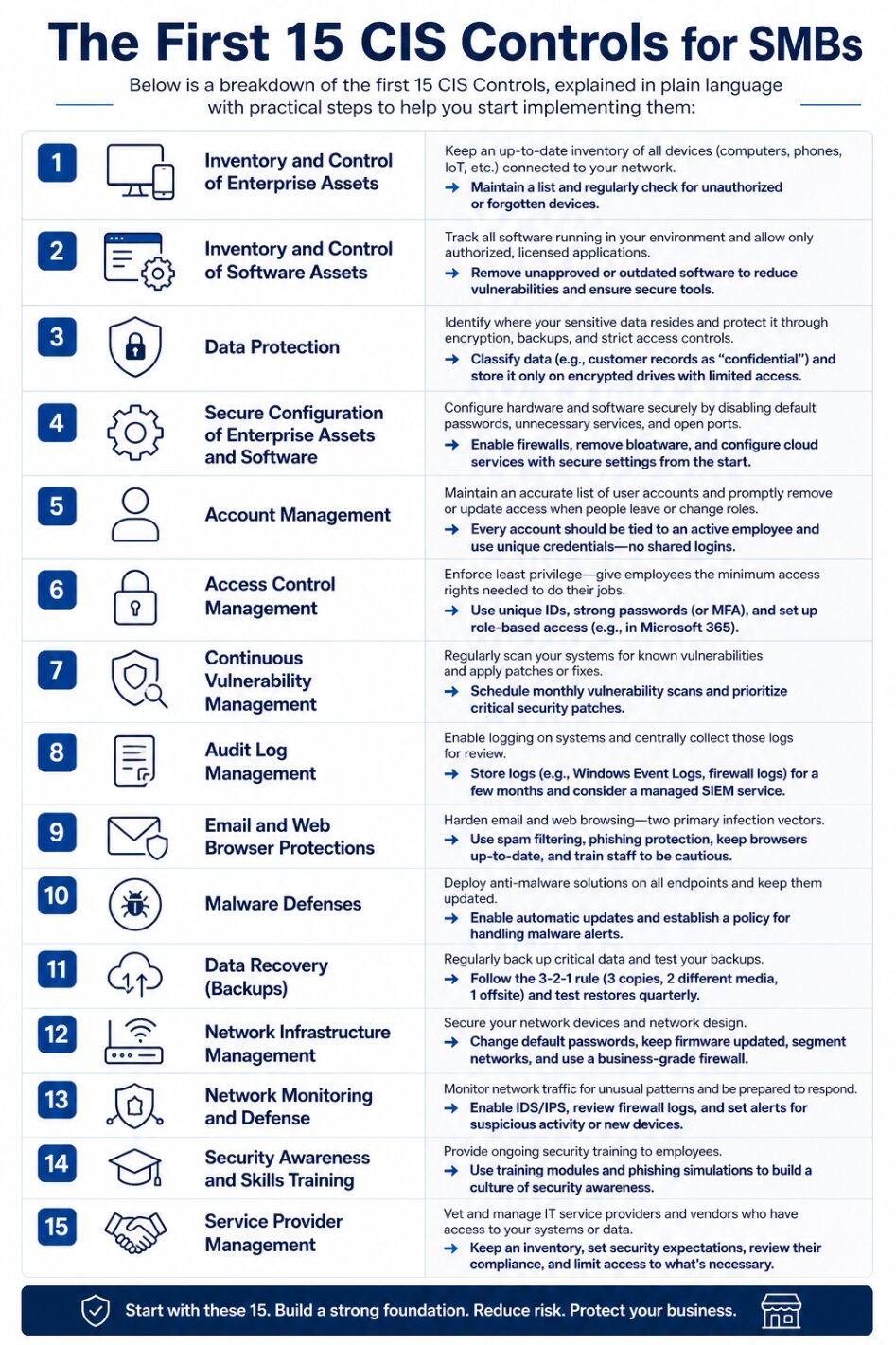
Downloadable CIS Controls for SMBs checklist
Support for Implementing the Essential 15
If implementing any of these controls feels daunting, remember you don’t have to do it alone. Consider an IT compliance and cybersecurity assessment. Cinch I.T. offers a Free IT Security Assessment that maps to frameworks like CIS to identify gaps and get expert guidance.
Managed cybersecurity services or managed IT support can help with continuously monitoring for vulnerabilities, manage patches, and enforce policies like access control. With outside help or dedicated tools, even resource-constrained SMBs can achieve these “essential 15” CIS Controls and significantly improve their defenses.
For more on our compliance and security services in Denver, check out our Cybersecurity & Compliance offerings on the Cinch I.T. Denver site covering risk assessments, training, and more to align with CIS and other standards.
Overview
Implementing these 15 CIS Controls establishes a strong baseline of security for any small business. They are considered “reasonable security measures” under various state laws and align with other frameworks like NIST CSF and HIPAA. The good news is many of these controls are low-cost or built into tools you may already use (like account management in Microsoft 365 or basic firewall settings in your router). By focusing on these essentials first, SMBs can drastically reduce cyber risk and improve their overall security posture.
Start with the basics – inventory assets, patch systems, train users – and build from there. It creates a security foundation that is easier to maintain and scale as your business grows or as you tackle more advanced controls down the road.
____________________________________________________________________________
Sources
- https://secureframe.com/blog/cis-critical-security-controls#:~:text=Consisting%20of%2015%20Controls%20and,ramp%E2%80%9D%20to%20the%20CIS%20Controls
- https://denverco.cinchit.com/outsourcing-it/#:~:text=I
____________________________________________________________________________
About the Author
Niko Zivanovich is a Cybersecurity Leader with experience in helping organizations understand and achieve a more complete security posture. He is a co-owner of Cinch IT of Denver and has been working at Pellera Technology Solutions for 6 years, most recently as the Director of Cyber Defense and Threat Intelligence. Niko specializes in CISO advising, netsec ops, incident response, pen testing, and threat intelligence research. He holds multiple certifications through the SANS GIAC organization and is a Board Director for the InfraGard Colorado and Wyoming Chapter.
Enjoyed the CIS Controls for SMBs: The 15 You Can Implement First article? If so then head over to our Blogs for more top tech tips.
Or follow our LinkedIn page for weekly tech tips, industry insights, and practical cybersecurity guidance for SMBs.
_______________________________________________________
About Cinch I.T.
Founded on the belief that I.T. support should be easy, Cinch I.T. has grown into one of the nation’s fastest-growing managed service providers. Our franchise model blends centralized expertise with local ownership, giving clients the best of both worlds. Our team is committed to being more than just a service provider, we’re your dedicated partner in achieving operational efficiency and peace of mind. With our fast, friendly, and transparent approach, you’ll always know where you stand and you always know you will have wi-fi security.
Discover how Cinch IT can support your success through smarter, more secure technology solutions. Contact us today!
Cinch IT Denver not your nearest location? View our nationwide Cinch I.T. offices:


![Top 5 Cameras for Zoom Meetings [BANNER] - remote work support, teleconferencing, business I.T. support, Zoom cameras](/wp-content/uploads/2022/05/Top-5-Cameras-for-Professional-Zoom-Meetings-BANNER-370x240_c.png "Top 5 Cameras for Professional Zoom Meetings [BANNER]")